ZOPs
ZOPs (Zero Operators) run generative models inside TouchDesigner. There are six kinds, and what a ZOP outputs follows its kind:
generatedImage (moviefileinTOP)generatedVideo (moviefileinTOP)generatedAudio (audiofileinCHOP)generated (textDAT)generatedModel (gltfinCOMP)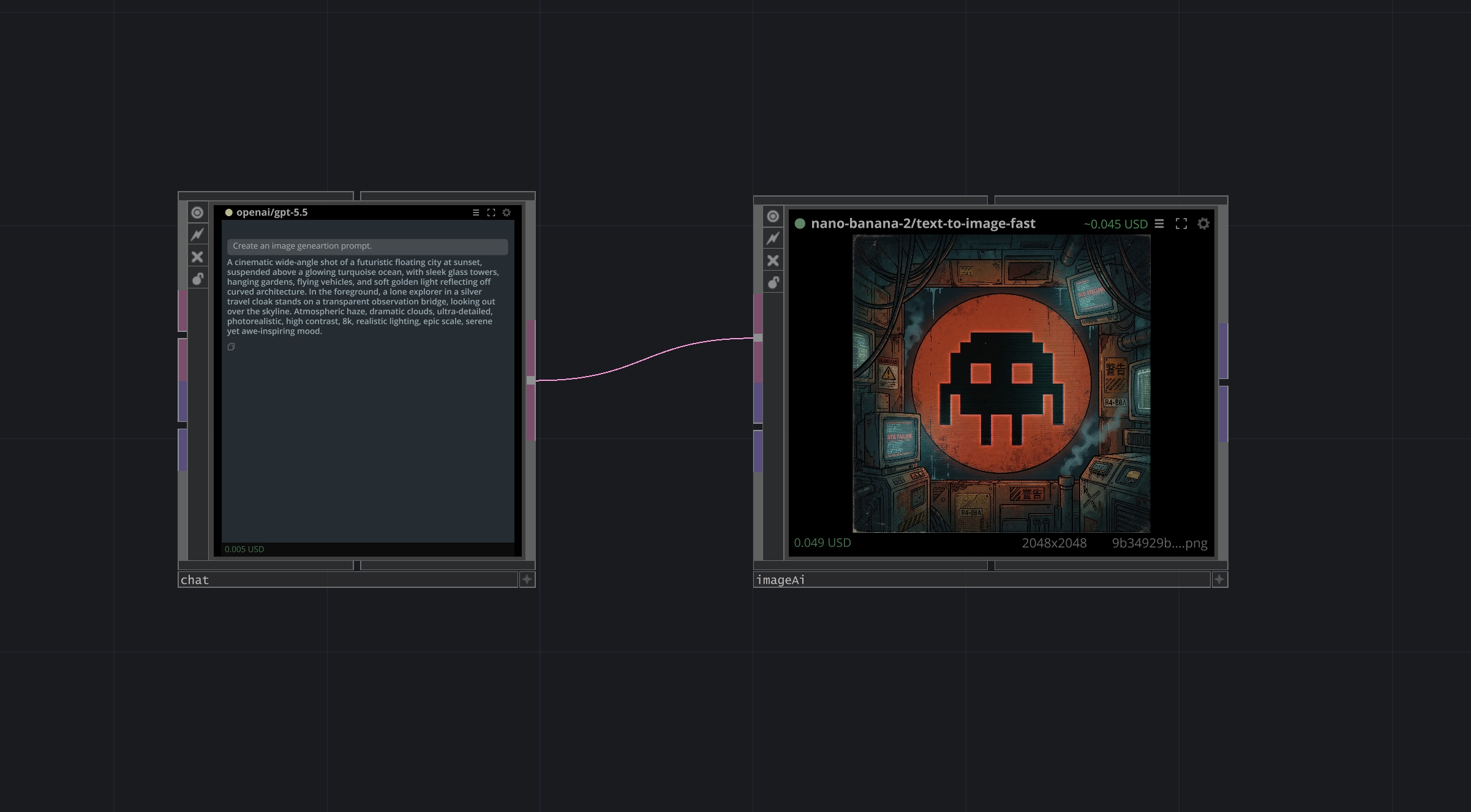
Above: a chat ZOP (openai/gpt-5.5) wired into an imageAi ZOP (nano-banana-2/text-to-image-fast). The chat ZOP wrote an image-prompt; its output (a DAT) feeds the image ZOP, which produced a 2048×2048 PNG. Connect any ZOP's output into another ZOP's input the same way you wire any TD operator.
Examples
Example patches in the Cloud: twozero.ai/hub/repo_ffac94d9….
Top bar
Left to right:
family/model. Click to swap the model — opens the ZOPs panel scoped to this ZOP; picking a new model replaces this one's family/model in place.~$X.XX — estimated price for the next Run based on the current model.textDAT with it into the current network — useful for archiving prompts or feeding them into other ops.Chat ZOPs have a shorter toolbar with no Post or Like. Image, video and digital human ZOPs have both; 3D and audio ZOPs have Like only.
Body
Image and video ZOPs render the generated frame. 3D ZOPs show an interactive viewer — tumble the generated mesh with the mouse; the geometry itself leaves the ZOP as a POP, ready to wire into a render chain. Text ZOPs show the input prompt on top and the generated response below. Image ZOPs also reserve a narrow column on the left for input previews — wired-in TOPs are shown there as thumbnails. On error, a clickable overlay covers the body (e.g. "Add credits" → opens billing, "twozero.ai required" → opens the install page).
Bottom bar
After a successful run: actual charge in USD on the left, output resolution in the middle, output filename on the right. Image and video ZOPs show all three; text ZOPs show only the cost.
Parameters
Right-click the ZOP, or click the gear button in the top bar — opens the full parameter dialog. Common to every ZOP:
- Run / Stop / Reset — pulse parameters; same as clicking the status dot (Run/Stop) or RMB → Reset.
- Prompt — the input text. Most ZOPs also accept a
promptDAT wired into the input, which takes precedence over par.Prompt when connected. - Family / Model — set by the ZOPs panel when you pick a model. You can also override manually.
- Autorunnext — when on, after a successful Run pulses Run on every ZOP wired to this one's output. Daisy-chain ZOPs to build live pipelines (output of A triggers B, B triggers C, ...).
- Callbackdat — optional DAT with
onSuccess(comp, result)/onError(comp, error)handlers for custom post-run logic.
Chat ZOPs add:
- Runonprompt — when on, re-runs automatically every time the prompt input (
par.Promptor the wired prompt DAT) changes.
Image and video ZOPs add:
- Aspect / Res — output aspect ratio and resolution class, populated from the model's allowed lists (greyed out when the model doesn't expose them). Resolution1 / Resolution2 set the desired pixel size for models that accept a free size.
- Use input resolution — off by default. When on and an image is wired into the ZOP, the output adapts to the incoming image: closest aspect ratio, resolution class never below 2k.
- Resize input images — normalize wired reference images to the output resolution before upload (pick a fit mode; Resize input extend controls how borders are filled). Disable sends them as-is.
- Seed + Randseed — control determinism. With Randseed on, every Run uses a new random seed.
- Autoselectmodel — when the family changes, auto-picks the family's default model instead of leaving the previous Model value.
- Duration — for video ZOPs, output length in seconds.
3D ZOPs add:
- Format — output file format when the model offers a choice (
Autoprefers glb, the only format TouchDesigner loads directly; other formats are downloaded but not previewed). - PBR materials — request PBR textures from models that support them.
- Face count — target polygon count;
0leaves it to the model. Clamped to the model's own limits.
Requires TouchDesigner 2025.33070 or newer (that build added the glTF In COMP).
Opening the panel
Open the ZOPs panel from the tool list, or via the hotkey assigned in Settings.
Selecting a model
Browse model families and individual variants. [ENTER] or LMB on a family creates a ZOP with the family-default model auto-selected. [ENTER] or LMB on a specific variant (listed indented under its family) pins that exact model. Families with one model are rendered flat.
Inspecting a model
RMB on any row opens model metadata and pricing.
Cost and balance
Generations are pay-per-use and one credit is one dollar. Estimated price per model is shown in the ZOPs panel next to each row; the actual charge appears in the status bar after a run completes. Failed generations are not charged. Top up your balance at app.twozero.ai/billing — see Billing & Credits for payment methods, bonuses and refunds.
Notes
Requires a TWOZERO account with balance. Models are sorted by usage history. ZOPs auto-update to the latest template version on next panel open. The model list is fetched live from twozero.ai on first panel open and cached for the session.